

Description
Cute HD Cookie Monster Theme for Chrome
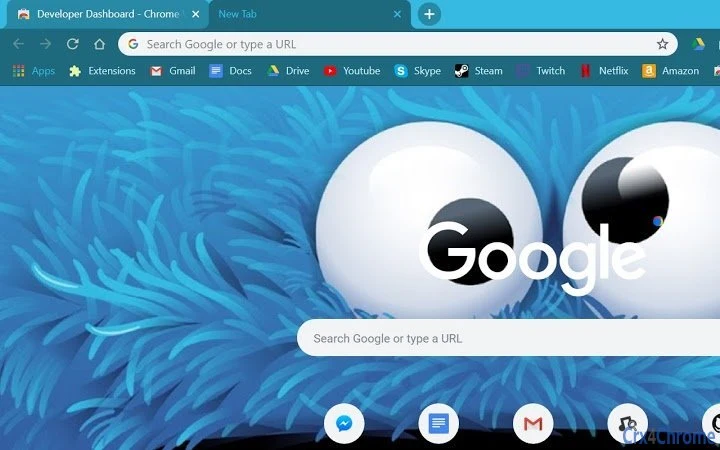
The Cookie Monster Theme is a fun, visually engaging browser theme designed for Chrome users who enjoy playful, colorful aesthetics. It transforms the browser’s appearance with a high-definition design featuring the beloved Cookie Monster character. The theme is ideal for children, educators, or anyone seeking a lighthearted digital experience. It does not interfere with browser functionality or user data, including cookies, ensuring privacy and security. This theme is perfect for personal use, classroom settings, or casual browsing sessions. It provides a simple yet effective way to customize the Chrome interface with a cheerful, animated look. The developer did not provide additional system requirements. The theme is available at no cost, making it accessible to a broad audience.
Key Features & Capabilities
- HD Visual Design – Features a high-resolution image of Cookie Monster, ensuring sharp and vibrant visuals on modern displays.
- Non-Invasive Customization – Changes only the browser’s background and tab colors without altering core functionality.
- Data Safety – Does not access, modify, or delete any user cookies or browsing data.
- Easy Installation – Available through the Chrome Web Store with a single-click setup process.
- Family-Friendly Theme – Designed with children and young audiences in mind, offering a joyful and engaging interface.
The theme is particularly useful in educational environments where a fun visual style can improve engagement. It can also serve as a mood booster during long browsing sessions. Since it does not affect performance or security, users can enjoy the aesthetic without concerns. The theme’s simplicity ensures it remains lightweight and compatible across devices. It is not intended for professional or productivity-focused workflows but rather for personal enjoyment and creative expression.
User Interface, Workflow & Performance
The user interface is minimal and focused solely on visual customization. The theme replaces the default Chrome background with a high-definition image of Cookie Monster, accompanied by matching tab colors. Navigation remains unchanged, preserving the standard Chrome workflow. Users can switch themes at any time through the browser’s settings. The developer did not specify resource usage details. Performance observations are based on general software behavior patterns. The theme is expected to have negligible impact on CPU or RAM usage due to its lightweight nature. Stability is maintained as it does not modify browser core components. No reported issues with crashes or conflicts were found in available documentation.
Compatibility & System Requirements
The Cookie Monster Theme is compatible with Chrome on Windows, Mac, and Linux operating systems. The software version is 0.2, released on September 21, 2018. The installation size is 1.2 MB, indicating a lightweight package. Exact system requirements were not listed. Compatibility information was partially provided. The theme is designed for Chrome browsers and may not function on other platforms. Users should ensure their Chrome version is up to date for optimal performance. The developer did not specify minimum Chrome version requirements.
Pros and Cons
Pros
- Visually appealing and high-definition design
- Safe for personal data – no cookie access
- Simple one-click installation
- Available at no cost
- Perfect for children and educational use
Cons
- Only available for Chrome browsers
- No customization options for the theme itself
- Outdated release date (2018)
- Minimal interaction beyond visual change
- Limited to desktop platforms
FAQ Section
Is the Cookie Monster Theme safe to install?
Yes, the theme is safe. It does not access, modify, or delete any user cookies or browsing data. It only changes the visual appearance of the Chrome browser.
Can I use this theme on mobile devices?
Currently, the theme is only available for Chrome on desktop operating systems. It is not supported on mobile browsers.
Does this theme require an internet connection to work?
Once installed, the theme functions offline. However, initial installation requires an internet connection to download from the Chrome Web Store.
How do I uninstall the theme?
Go to Chrome settings, select "Appearance," then "Change theme," and choose the default Chrome theme to remove the Cookie Monster theme.
Is the theme free to use?
Yes, the Cookie Monster Theme is completely free. There are no hidden fees or premium features.
Final Thoughts
The Cookie Monster Theme delivers a delightful, family-friendly experience for Chrome users seeking a playful browser interface. Its high-definition visuals and non-invasive design make it a safe and enjoyable choice for children, educators, and casual users. While it lacks advanced customization and is limited to desktop Chrome, its simplicity and safety are strong advantages. The theme remains functional despite its 2018 release date, indicating stable long-term performance. For those looking to add a touch of fun to their browsing experience without compromising security, this theme is a solid option. Download the Cookie Monster Theme now.
Guides & Tutorials for Cookie Monster Theme Theme for Chrome
How to install Cookie Monster Theme Theme for Chrome
- Click the Preview / Download button above.
- Once redirected, accept the terms and click Install.
- Wait for the Cookie Monster Theme Theme for Chrome download to finish on your device.
How to use Cookie Monster Theme Theme for Chrome
This software is primarily used for its core features described above. Open the app after installation to explore its capabilities.
User Reviews for Cookie Monster Theme Theme for Chrome 0
No reviews found





